

Password Managers for Small Businesses: Why Spreadsheets Are a Security Risk

The Hidden Risk Sitting in Your Shared Drive
It usually starts innocently.
A shared spreadsheet titled:
“Passwords – DO NOT DELETE.”
Inside are logins for:
The website
The domain registrar
QuickBooks
The company credit card portal
Social media accounts
Email admin access
It feels organized. Convenient. Efficient.
It’s also a liability.
Small businesses often think cybersecurity failures happen because of advanced hackers. In reality, they usually happen because of simple internal weaknesses. Shared spreadsheets full of passwords are one of the most common.
Let’s walk through why.
A Real Scenario: An Employee Leaves
One of your team members resigns.
They had access to:
The shared password spreadsheet
Admin access to Google Workspace
The marketing platform
Vendor billing portals
Now ask yourself:
Who changes every password?
How long does that take?
What gets missed?
Does anyone even know all the systems they had access to?
In most small businesses, password rotation after an employee departure is inconsistent at best.
Sometimes nothing gets changed at all.
That’s not malicious. It’s operational overload.
But from a security perspective, that’s exposure.
Why Spreadsheets Create Structural Risk
Spreadsheets were built for numbers. Not for secure credential management.
Here’s where the problems show up:
1. No Access Control Granularity
If someone can open the file, they can see everything.
There’s no way to:
Give accounting access to accounting tools only
Give marketing access to social media only
Restrict administrative credentials
It’s all or nothing.
2. No Audit Trail
You can’t easily answer:
Who accessed this?
When did they view it?
Did they copy credentials?
Did they export the file?
Accountability disappears.
3. No Secure Sharing
Passwords are often:
Downloaded locally
Copied into emails
Sent via text message
Now your credentials exist in multiple uncontrolled places.
4. No Easy Offboarding
When someone leaves, you must:
Change everything manually
Hope you didn’t miss anything
Trust they didn’t save credentials elsewhere
That’s not a process. That’s hope.
Spreadsheet vs Password Manager
Here’s the practical difference:
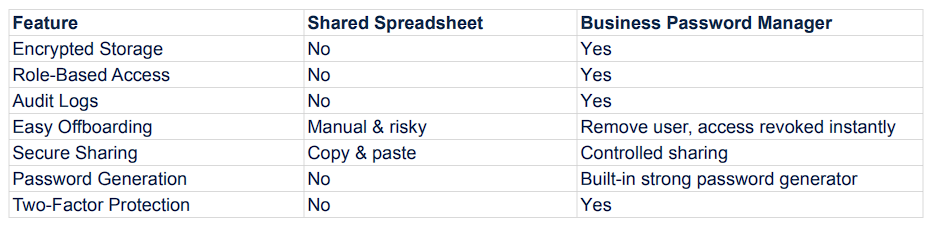
Spreadsheet vs Password Manager Table
A password manager is not about convenience.
It’s about control.
What a Password Manager Actually Solves
For small businesses, a proper password manager allows you to:
Assign access by role
Share credentials without exposing the raw password
Revoke access instantly when someone leaves
Track activity logs
Generate strong, unique passwords automatically
Enforce multi-factor authentication on the vault itself
Instead of one fragile spreadsheet, you get a controlled environment.
It becomes infrastructure, not a document.
“Won’t This Slow My Team Down?”
That’s the usual concern.
In practice, it does the opposite.
Modern business password managers:
Auto-fill credentials
Sync across devices
Work with browsers and mobile apps
Reduce forgotten password resets
It removes friction while increasing security.
Security only works long-term if it fits into workflow. Password managers do.
When Should a Business Make the Switch?
Immediately, if:
You have more than one employee
You share logins
You store credentials in Google Sheets or Excel
You have no documented offboarding process
You cannot list every system your team can access
If you hesitate answering that last one, that’s your signal.
This Is About Operational Discipline
Cybersecurity for small businesses is rarely about advanced tools.
It’s about eliminating weak foundations.
A shared password spreadsheet is a weak foundation.
A properly configured password manager is controlled, auditable, and scalable.
It’s not dramatic.
It’s not expensive.
It’s structured.
And structure prevents problems.
The Bigger Picture
Password management is usually the first correction made when assessing a small business’s digital risk.
It exposes:
Who has access
Where access is duplicated
Which accounts are unmanaged
Which credentials are weak
Fixing it strengthens everything else.
That’s why it’s often the first step in a Digital Preparedness Review.
If your business is still relying on shared spreadsheets for credentials, it may be time to implement a system designed for control, not convenience.
Preparedness over panic.
Discipline over drama.
